Calculator The Game Online: How to Play Free + Tips
Play Calculator The Game online free: learn what REV, SUM, SHIFT and MIR do, follow real solved levels and use pro tips to beat all 500 Puzzit levels.
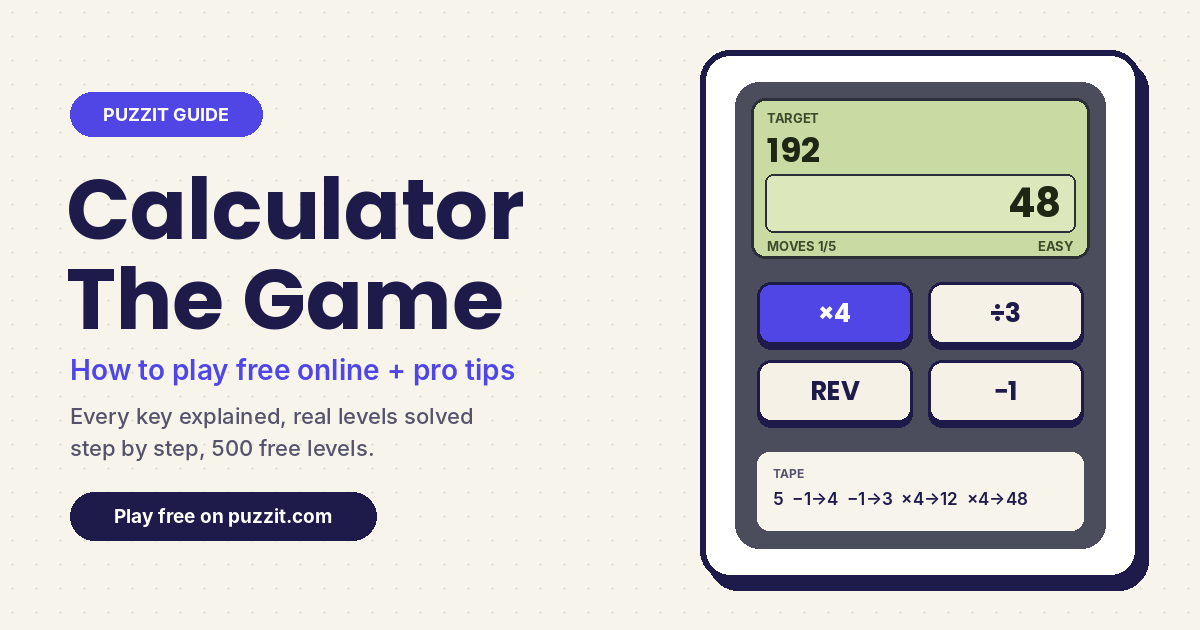
Calculator The Game turns the most boring gadget on your desk into a puzzle. You get a starting number, a target number, a strict move limit and a handful of strange keys, and you have to land on the target exactly. The idea was made famous by the 2017 mobile hit Calculator: The Game from Simple Machine, and you can play the same style of puzzle free in your browser as Puzzit Calculator Game: 500 levels, no download, no sign-up.
This guide explains what every key does, walks through real Puzzit levels step by step, and shares the habits that turn "stuck on level 40" into "how did I ever miss that". It also covers how the online version compares with the original app, so you know exactly what you are playing.
GAME
Calculator Game
Reach the target number in limited moves using only the keys on screen.
LEVELS
500 handcrafted
Four tiers: Easy, Medium, Hard and Expert.
SPECIAL KEYS
REV, SUM, SHIFT, MIR
Plus digit append, backspace and the four basic operations.
PRICE
100% free
Plays in any browser on phone, tablet or desktop.
What Is Calculator The Game?
Calculator: The Game is a puzzle app by the small studio Simple Machine, released in 2017 for iPhone and Android. Its App Store pitch sums it up: you manipulate numbers by adding, subtracting, converting and reversing them. The original has around 200 levels, a snarky assistant called Clicky, and later mechanics such as portals; a sequel, Calculator 2: The Game, followed in 2018.
The core loop is what makes the genre so addictive, and it is the loop Calculator Game on Puzzit is built around: a display, a target, a move counter and a limited keypad. Each key press costs one move. Hit the target before the counter reaches zero and the next level unlocks; run out and you simply retry. It feels like arithmetic but plays like a logic puzzle, because the hard part is choosing the order of operations, not doing the sums.
How to Play Calculator The Game Online
- Read the screen. The green LCD shows the Target at the top, your current Display number and the Moves you have left (for example "MOVES 3/3").
- Check the available keys. Every level gives you a small set, usually four. Some are plain arithmetic like +7 or ×4; others change the digits themselves.
- Press keys in sequence. Each tap transforms the display and uses one move. The Tape at the bottom logs every step, such as "START 12, REV → 21, +2 → 23".
- Land exactly on the target. When the display matches the target, the level is solved. You do not have to use every move: on Level 2 we reached 23 from 12 in 2 of the 3 allowed moves and it still counted.
- Retry freely. Run out of moves and the game shows "Out of moves" with a Retry button. Reset is instant and costs nothing, and Prev / Next let you revisit or skip levels.
Every Calculator Key Explained
| Key | What it does | Example |
|---|---|---|
| + − × ÷ | Basic arithmetic on the display. Division only works if the answer is a whole number. | 12 ÷ 3 → 4 (but 10 ÷ 3 does nothing) |
| Digit key (e.g. 2, 9, 0) | Appends that digit to the end of the number. | 9 then [2] → 92 |
| ⌫ (backspace) | Deletes the last digit. A single digit becomes 0. | 438 → 43, 6 → 0 |
| REV | Reverses the digits. Leading zeros disappear. | 12 → 21, 1204 → 4021 |
| SUM | Replaces the number with the sum of its digits. | 987 → 24 |
| SHIFT | Moves the first digit to the end. | 1234 → 2341 |
| MIR | Mirror: appends the reversed digits, making a palindrome. | 12 → 1221 |
MIR is the key most players misread. It does not reverse the number (that is REV); it doubles its length by adding a mirror image to the right. We confirmed it on Level 8, where 12 became 1221 on a single press.
Worked Examples From Real Puzzit Levels
Reading rules only goes so far, so here are three early levels solved move by move. Each one teaches a different habit you will use for the rest of the game.
Level 3: spot the decoy key
Start 11, target 40, 4 moves, keys +7, −3, SUM and ×2. SUM looks tempting, but it shrinks 11 to 2 and wastes a move. The working route ignores it: 11 +7 = 18, ×2 = 36, +7 = 43, −3 = 40. Lesson: not every key on the pad is part of the answer. Some are there to distract you.
Level 4: work backwards from the target
Start 5, target 192, 5 moves, keys ×4, ÷3, REV and −1. Going forward is guesswork, so ask what the last move could be. 192 divides by 4 to give 48, which divides by 4 to give 12, which divides by 4 to give 3. So the plan is "get to 3, then ×4 three times". From 5 that is just −1, −1. Full solution: 5 → 4 → 3 → 12 → 48 → 192. A brute-force check of every possible sequence confirms it is the only 5-move answer.
Level 8: build big numbers with MIR
Start 2, target 4661, 5 moves, keys +5, −3, MIR and +2. A four-digit target from a single digit in five moves means you must use MIR. 4661 is close to 4664, which is 46 mirrored, and 46 is 44 + 2, which is 4 mirrored. So: 2 +2 = 4, MIR = 44, +2 = 46, MIR = 4664, −3 = 4661. Notice the first instinct (+5 then MIR) leads to 1221 and a dead end.
Calculator The Game Tips and Tricks
- Count the moves first. The move limit is a hint. A target of 192 in 5 moves with a ×4 key strongly suggests repeated multiplication; a 4-digit target in a few moves suggests appending, MIR or REV.
- Work backwards. Undo operations from the target: if the last key is ×4, the number before it must be target ÷ 4. If the target does not divide cleanly, that key was not last.
- Factor the target. 192 = 3 × 4 × 4 × 4 and 110 = 55 × 2. Prime factors tell you which multiply keys matter and how many times.
- Look at the final digit. If the target ends in a digit you have as an append key, the last move may simply be that digit. Level 7 (start 10, target 92) is just −1 then [2].
- Use SUM and ⌫ to shrink. When numbers balloon past the target, SUM or backspace cut them down fast. Level 5 asks you to turn 6 into 0, and one press of ⌫ does it.
- Treat REV as a cheap jump. REV can turn 12 into 21 or 19 into 91 for one move, often cheaper than several additions.
- Use the Tape. When a run fails, read the Tape to see where you went off track, then Reset and change only that step.
Why bother learning a method instead of copying answers? Walkthrough sites for the original app note that the developers rearranged levels after launch, so numbered solutions often stop matching. Puzzit levels have their own numbering too. Working backwards and counting moves works on any level, in any version.
Puzzit Calculator Game vs the Original App
| Calculator Game (Puzzit) | Calculator: The Game (app) | |
|---|---|---|
| Where to play | Any web browser | iPhone and Android apps |
| Price | Free | Free on mobile with ads and in-app purchases |
| Levels | 500 in four tiers | Around 200 |
| Special keys | REV, SUM, SHIFT, MIR, append, ⌫ | Reverse, SUM, shift, mirror, replace, store, portals and more |
| Story | None, pure puzzles | Light story with Clicky the assistant |
| Skip levels | Yes, with Next | Hints instead |
If you loved the app and want more levels without installing anything, the browser version is the natural next step. If you want other number puzzles with the same "find the exact route" feel, try Mathle for a daily equation to guess, Cross Math for grid equations, or Hyper Math for faster arcade arithmetic. Our guides to the Mathle math Wordle game and math crossword puzzles cover those in depth, and the best number puzzle games roundup lists 15 more.
Frequently Asked Questions
Can I play Calculator The Game online for free?
Yes. Puzzit Calculator Game runs in your browser with no download, account or payment, on desktop and mobile. The original Calculator: The Game is a separate app on the App Store and Google Play.
Who made Calculator: The Game?
The original app was made by Simple Machine, LLC and released in 2017. The same studio released the sequel, Calculator 2: The Game, in 2018. Puzzit Calculator Game is an independent browser puzzle in the same style.
How many levels are in the calculator game?
Puzzit has 500 levels split into Easy, Medium, Hard and Expert, finishing at Level 500 (start 2, target 515, 7 moves). The original app has around 200 levels, so there is an end in both versions.
Can you beat a level in fewer moves than shown?
Yes. The move counter is a maximum, not a requirement. Any sequence that reaches the target before the counter hits zero completes the level, so a shorter route is always allowed.
What does the MIR button do in the calculator game?
MIR mirrors the number by adding its reversed digits to the end, so 12 becomes 1221 and 46 becomes 4664. It is different from REV, which only flips the order of the digits (12 becomes 21).
Is the calculator game good for kids?
Yes. Early levels only need simple addition, subtraction and multiplication, and there is no timer, so it rewards planning rather than speed. Later tiers are a real challenge for adults too.
Ready to Beat Level 1?
Open Calculator Game on Puzzit, solve the first level (start 10, target 16, two moves) and see how far the backwards-thinking habit takes you. When you want a change, explore all of our free number games.